Questions and postings pertaining to the usage of ImageMagick regardless of the interface. This includes the command-line utilities, as well as the C and C++ APIs. Usage questions are like "How do I use ImageMagick to create drop shadows?".
Marcel71
Posts: 49 Joined: 2011-04-13T13:57:34-07:00Authentication code: 8675308
Contact:
Post
by Marcel71 2019-10-01T15:01:47-07:00
Hi,
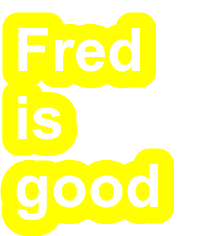
In an old IM version (6) this was working properly, however with 7 the stroke gets cut of at the top and left side of the image and I get a smutchy edge. Does anybody know how to do this correct in IM7 (without changing the label text by adding extra spaces or \n)?
Code: Select all
convert -background none -fill "#ffff00" -font Arial-Bold -pointsize 60 -interline-spacing 0 -stroke "#ffff00" -strokewidth 32 label:"Fred\nis\ngood" -stroke none label:"Fred\nis\ngood" -compose DstOut -composite +repage out.png
In IM 6.8.7-9
In IM 7.0.8-66
I am on Ubuntu 18.04
Version: ImageMagick 7.0.8-66 Q16 x86_64 2019-09-29
https://imagemagick.org
Copyright: © 1999-2019 ImageMagick Studio LLC
License:
https://imagemagick.org/script/license.php
Features: Cipher DPC HDRI
Delegates (built-in): bzlib djvu fftw fontconfig freetype jbig jng jpeg lcms lqr ltdl lzma openexr pangocairo png tiff wmf x xml zlib
Regards,
Marcel
Marcel71
Posts: 49 Joined: 2011-04-13T13:57:34-07:00Authentication code: 8675308
Contact:
Post
by Marcel71 2019-10-04T13:52:31-07:00
Hi Magick,
Thanks for the fix. In the meantime I came up with the following command to let it work on the current version
(First make a empty canvas with the size of the text and then annotote with a displacement of half of the strokewidth)
Code: Select all
magick convert -background none -gravity center -density 72 -fill "#ffff00" -font Arial-Bold -pointsize 60 -interline-spacing 0 -stroke "#0000ff" -strokewidth 32 label:"Magick\nIs\nCool" -bordercolor transparent -alpha transparent -write mpr:canvas +delete -gravity west \( mpr:canvas -stroke none -annotate +16+0 "Magick\nIs\nCool" \) \( mpr:canvas -stroke "#0000ff" -annotate +16+0 "Magick\nIs\nCool" \) -compose Out -composite -virtual-pixel background +repage out.png
Thanks,
Marcel
Marcel71
Posts: 49 Joined: 2011-04-13T13:57:34-07:00Authentication code: 8675308
Contact:
Post
by Marcel71 2019-10-05T08:07:56-07:00
Hi magick,
The fix is good when the text is aligned West, but when the text is aligned Center or East is does not work properly:
Code: Select all
convert -background none -fill "#ffff00" -gravity Center -font Arial-Bold -pointsize 60 -interline-spacing 0 -stroke "#ffff00" -strokewidth 32 label:"Fred\nis\ngood" -stroke none label:"Fred\nis\ngood" -compose DstOut -composite +repage out.png
Regards,
Marcel
magick
Site Admin
Posts: 11064 Joined: 2003-05-31T11:32:55-07:00
Post
by magick 2019-10-05T10:19:36-07:00
Thanks for the analysis. We reverted the text offset patch but kept the DstOut composition patch. You will bet proper text edges now.
Users browsing this forum: Amazon [Bot] , Bing [Bot] , Google [Bot] and 1 guest