(Sorry for my English... but an image is like a thousand of words)
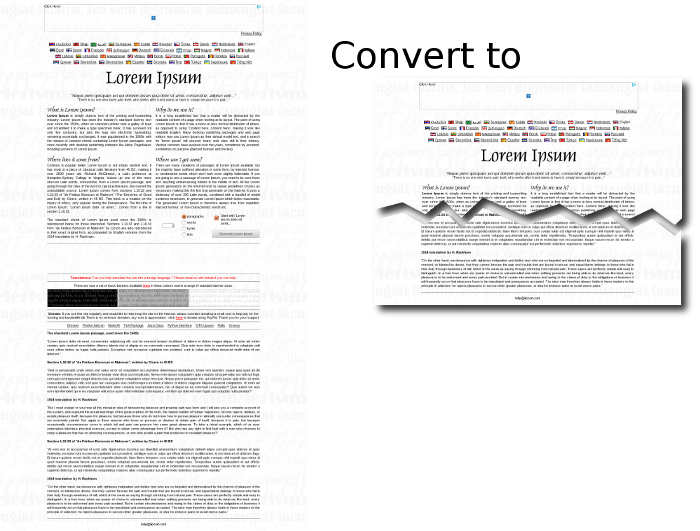
Thanks in advance

Code: Select all
%IM%convert -size 1000x6000 gradient:red-blue sample.png


%IM%convert ^
  -size 1000x100 xc: ^
  -draw "path 'M0,50 L333,99 L666,0 L999,50 L999,99 L0,99 Z'" ^
  cutout_mask.png

%IM%convert ^
  sample.png ^
  ( -clone 0 -gravity North -crop 1000x200+0+0 +repage -write cutout_Top.png ) ^
  ( -clone 0 -gravity South -crop 1000x200+0+0 +repage -write cutout_Bottom.png ) ^
  NULL:

%IM%convert ^
  cutout_Bottom.png ^
  ( +clone -fill Black -colorize 100 cutout_mask.png -negate -gravity North -composite ) ^
  -alpha off ^
  -compose CopyOpacity -composite ^
  cutout_Bottom_cut.png

%IM%convert ^
  cutout_Top.png ^
  ( +clone -fill White -colorize 100 cutout_mask.png -gravity South -composite ) ^
  -alpha off ^
  -compose CopyOpacity -composite ^
  cutout_Top_cut.png

%IM%convert ^
  cutout_Top_cut.png ^
  ( cutout_Bottom_cut.png -repage +0+150 ) ^
  -background None -layers Merge ^
  cutout.png

%IM%convert ^
  cutout.png ^
  ( +clone -background Black -shadow 80x2+12+12 ) ^
  -background None ^
  +swap -layers Merge +repage ^
  cutout_shad.png
Users browsing this forum: Bing [Bot], Semrush [Bot] and 2 guests