convert a.svg b.png
Works well enough, but the "a" image ends on a background - is there a way to retain the transparency from the svg in the png file?
How to convert svg to pgn and keep transparency?
-
whugemann

- Posts: 289
- Joined: 2011-03-28T07:11:31-07:00
- Authentication code: 8675308
- Location: Münster, Germany 52°N,7.6°E
- Contact:
Re: How to convert svg to pgn and keep transparency?
Wolfgang Hugemann
Re: How to convert svg to pgn and keep transparency?
Its still on a white background alas.whugemann wrote:How about
convert -background none a.svg b.png
See http://www.imagemagick.org/Usage/draw/#svg
-
fmw42

- Posts: 25562
- Joined: 2007-07-02T17:14:51-07:00
- Authentication code: 1152
- Location: Sunnyvale, California, USA
- Contact:
Re: How to convert svg to pgn and keep transparency?
IM 6.7.0.10 Q16 Mac OSX Tiger
I took the following SVG code from http://www.w3.org/TR/SVG/shapes.html#RectElement and saved it as test.svg
<?xml version="1.0" standalone="no"?>
<!DOCTYPE svg PUBLIC "-//W3C//DTD SVG 1.1//EN"
"http://www.w3.org/Graphics/SVG/1.1/DTD/svg11.dtd">
<svg width="12cm" height="4cm" viewBox="0 0 1200 400"
xmlns="http://www.w3.org/2000/svg" version="1.1">
<desc>Example rect01 - rectangle with sharp corners</desc>
<!-- Show outline of canvas using 'rect' element -->
<rect x="1" y="1" width="1198" height="398"
fill="none" stroke="blue" stroke-width="2"/>
<rect x="400" y="100" width="400" height="200"
fill="yellow" stroke="navy" stroke-width="10" />
</svg>
When I do:
convert test.svg test.png
or
convert test.svg -channel rgba -alpha on test.png
or
convert test.svg -background none test.png
or
convert test.svg PNG32:test.png
or
convert test.svg -define png:color-type=6 test.png
or
convert test.svg test.gif
or
convert test.svg test.tif
I get a white background also.
However, when I do
convert -background none test.svg test.png
Then the yellow inner rectangle and the transparent outer rectanger are both transparent and only the blue outlines show.
I am not an expert on SVG files. But I am using RSVG which should be better that SVG.
convert -list format
SVG SVG rw+ Scalable Vector Graphics (RSVG 2.32.1)
P.S I opened test.svg in GIMP and saved it as PNG (making sure to save the background as is -- checkbox). The PNG file created had a proper yellow rectangle inside a transparent rectangle, both with blue borders.
So it would seem that one needs to somehow tell IM to preserve the background from the svg file. But I don't know how one would do that. I would assume that would be automatic/default?
So I don't know enough about SVG files to know if this is user error or a bug. But it would appear to me to be a bug.
I took the following SVG code from http://www.w3.org/TR/SVG/shapes.html#RectElement and saved it as test.svg
<?xml version="1.0" standalone="no"?>
<!DOCTYPE svg PUBLIC "-//W3C//DTD SVG 1.1//EN"
"http://www.w3.org/Graphics/SVG/1.1/DTD/svg11.dtd">
<svg width="12cm" height="4cm" viewBox="0 0 1200 400"
xmlns="http://www.w3.org/2000/svg" version="1.1">
<desc>Example rect01 - rectangle with sharp corners</desc>
<!-- Show outline of canvas using 'rect' element -->
<rect x="1" y="1" width="1198" height="398"
fill="none" stroke="blue" stroke-width="2"/>
<rect x="400" y="100" width="400" height="200"
fill="yellow" stroke="navy" stroke-width="10" />
</svg>
When I do:
convert test.svg test.png
or
convert test.svg -channel rgba -alpha on test.png
or
convert test.svg -background none test.png
or
convert test.svg PNG32:test.png
or
convert test.svg -define png:color-type=6 test.png
or
convert test.svg test.gif
or
convert test.svg test.tif
I get a white background also.
However, when I do
convert -background none test.svg test.png
Then the yellow inner rectangle and the transparent outer rectanger are both transparent and only the blue outlines show.
I am not an expert on SVG files. But I am using RSVG which should be better that SVG.
convert -list format
SVG SVG rw+ Scalable Vector Graphics (RSVG 2.32.1)
P.S I opened test.svg in GIMP and saved it as PNG (making sure to save the background as is -- checkbox). The PNG file created had a proper yellow rectangle inside a transparent rectangle, both with blue borders.
So it would seem that one needs to somehow tell IM to preserve the background from the svg file. But I don't know how one would do that. I would assume that would be automatic/default?
So I don't know enough about SVG files to know if this is user error or a bug. But it would appear to me to be a bug.
-
whugemann
- Posts: 289
- Joined: 2011-03-28T07:11:31-07:00
- Authentication code: 8675308
- Location: Münster, Germany 52°N,7.6°E
- Contact:
Re: How to convert svg to pgn and keep transparency?
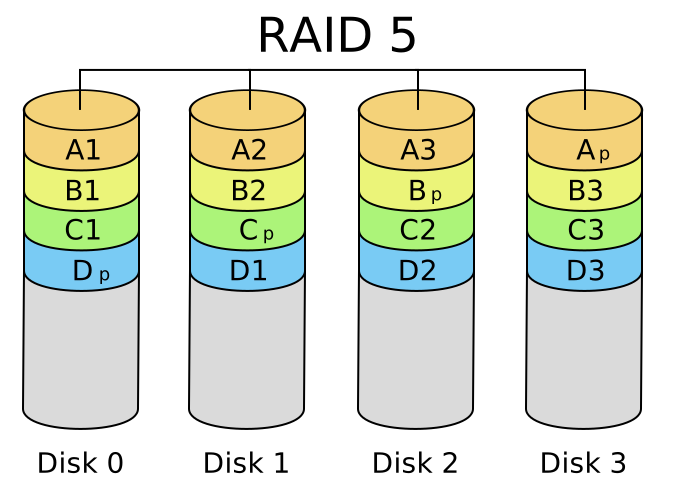
I took http://upload.wikimedia.org/wikipedia/c ... RAID_5.svg for my testing and arrived at a transparent background.
The difference to Fred's SVG is that "my" SVG defines a transparent page as a background, whereas Fred's small SVG example defines the "page" by a transparent rectangle, so it's no "background". Fred's page rectangle is however transparent ("fill none") and seems to be not redered correctly by IM's import filters.
The difference to Fred's SVG is that "my" SVG defines a transparent page as a background, whereas Fred's small SVG example defines the "page" by a transparent rectangle, so it's no "background". Fred's page rectangle is however transparent ("fill none") and seems to be not redered correctly by IM's import filters.
Wolfgang Hugemann
Who is online
Users browsing this forum: Ahrefs [Bot], Semrush [Bot] and 2 guests